How To Fix Electronic Ear Muffs Audio Cutout When Moving?
Do your electronic ear muffs cut out every time you turn your head or move around? You’re not alone.
This is one of the most common complaints among shooters, hunters, and workers who rely on electronic hearing protection. One second you hear clearly. The next, the sound disappears.
The good news? This problem is usually easy to fix.
Most audio cutouts happen because of loose jack connections or poor cord positioning. Sometimes it’s simply how you’re wearing the device.
In a Nutshell
- Check your jack connection first. A loose fit is the top reason sound cuts out when you move. Push the plug in fully and make sure it clicks into place.
- Watch your cord positioning. Cords that pull or twist during movement can break the audio signal. Keep the cord loose and free from tension.
- Inspect your foam ear pads. Worn or flattened foam breaks the seal and causes weak contact. This often leads to random sound loss.
- Try gel ear pads instead. Gel pads create better contact than standard foam. They also hold their shape longer.
- Know that some cutout is normal. Electronic ear muffs use sensitive electronics. Minor interference happens even in working devices.
- Rule out user error before assuming it’s broken. Many cutout issues come from incorrect pad installation or careless cord handling. Fixing your technique often solves the problem completely.
Why Audio Cuts Out When You Move Your Head
When you move your head, your electronic ear muffs may lose sound because of how the internal components respond to motion. The most common reason is a loose jack connection where the audio cable plugs into the device. This connection can shift slightly when you turn your head or adjust the ear cups, causing the audio to drop out temporarily.
Another major factor is cord positioning. The cable running from your ear muffs to the battery pack or control unit can pinch, stretch, or move out of place as you move around. When the cord shifts position, it may interrupt the electrical signal traveling through it. This is why the cutout often happens at specific head angles or movements.
Worn foam ear pads also play a role in audio cutout. When the foam deteriorates or compresses over time, it loses its ability to maintain proper contact with your ears. This poor contact can affect how the audio signal reaches your ear canal, especially during movement when the seal becomes even weaker.
Electrical interference is another factor to understand. Electronic hearing protection devices naturally experience some minor electrical interference as a normal part of how they function. When you move, this interference can become more noticeable, making it sound like the audio is cutting out when it’s actually just the device working as designed.
User error also contributes to this problem. Incorrect ear pad installation, wearing the ear cups too loosely, or not positioning the cord properly during use can all trigger audio cutouts during head movement.
The key takeaway is that audio cutout during movement usually stems from physical connection issues rather than a broken device. Most of these problems are fixable with simple adjustments and proper maintenance. Understanding these causes helps you identify whether you need a quick fix or if something truly needs replacement.
Checking and Securing Jack Connections
Your jack connection is the first place to look when audio cuts out during movement. This small connector carries all the sound signals between your ear muffs and the audio source. A loose jack means interrupted sound.
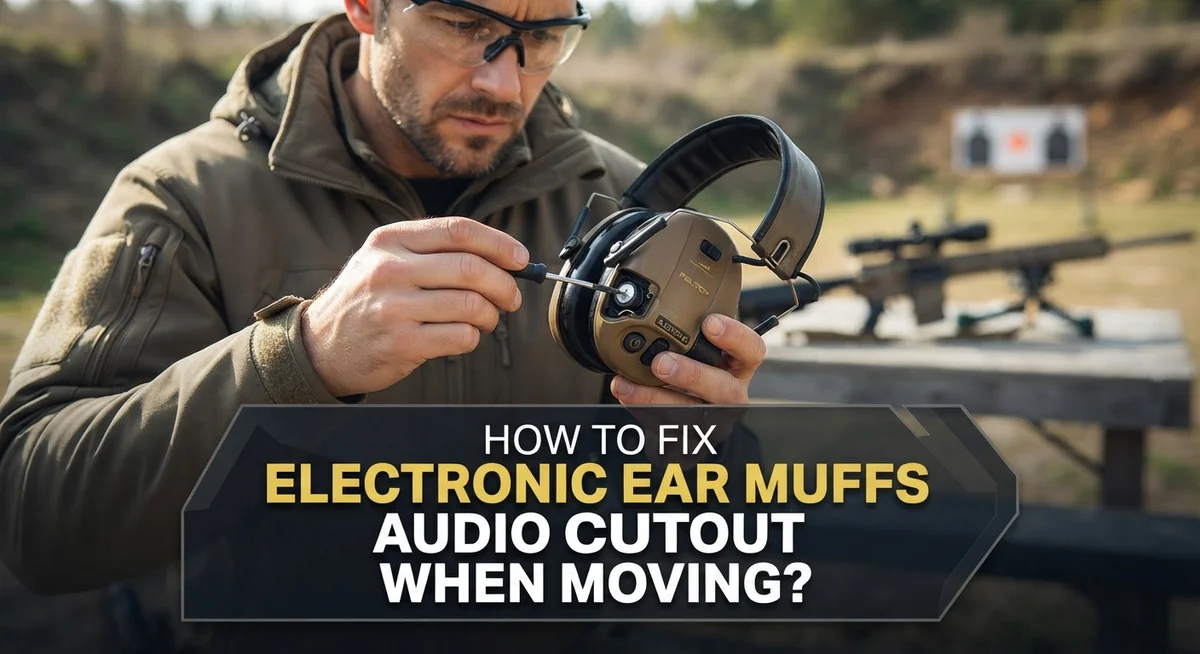
Start by powering off your device completely. This protects the internal components while you work. Next, locate the jack where your cord plugs into the ear muffs. Gently wiggle the connector while holding the port steady. You should feel some resistance, but it shouldn’t slide in and out easily.
Check for visible debris around the jack opening. Dust, lint, or dirt can prevent a solid connection. Use a clean, dry cloth to gently wipe around the port. Never use liquids or force compressed air directly into the opening, as this can damage internal circuits.
Now inspect the jack connector itself on your cord. Look for bent pins, corrosion, or discoloration. The metal contacts should appear shiny and clean. If you see green or white buildup, this indicates oxidation that blocks electrical flow. Gently rub the connector with a dry cloth to remove light oxidation.
Reinsert the jack firmly until you hear or feel a click. The connection should feel snug and secure. Wiggle it gently to confirm it stays in place. Power your device back on and test the audio while moving your head slowly.
Pay attention to whether the cutout happens in specific head positions. If sound cuts out only when you turn left, the cord may be pinched or twisted on that side. Reposition the cord to hang naturally without tension. Many audio cutout problems resolve simply by ensuring the jack sits completely seated and the cord routes properly without kinks or pressure points.
Proper Cord Positioning and Management Techniques
Cord positioning directly affects whether your audio stays consistent during movement. When you move your head, the cord can shift and create tension that interrupts the signal connection. Understanding how to manage this tension is essential.
Start by keeping your cord loose but secure. The cord should not be pulled tight across your neck or shoulders. Tight cords create stress on the jack connection and can cause intermittent audio loss. Instead, let the cord hang naturally with some slack.
Position the cord down the center of your chest or along one shoulder. Avoid wrapping it around your neck multiple times. Each wrap adds pressure points that can disrupt the audio signal. A simple single path works best for most users.
Check where the cord enters the ear cup. This connection point is critical. The cord should not be bent at sharp angles where it meets the ear muff. Gentle curves are fine. Sharp bends create internal stress that cuts audio during head movement.
When you move, try to move your head slowly at first. Quick jerking motions can create sudden tension spikes. Once you identify which head positions cause cutout, you can adjust your cord path to avoid those angles.
Secure excess cord length so it doesn’t swing freely. You can use a small clip or tie to keep extra cord against your body. This prevents the cord from moving independently when you move your head.
Test different cord positions while wearing the ear muffs. Move your head left and right, up and down. Pay attention to which positions trigger audio loss. Once you find the best path, keep the cord in that position consistently.
Proper cord management prevents most audio cutout problems. This simple adjustment often solves the issue without any replacement parts needed.
Step-by-Step Guide to Diagnosing the Cutout Source
Audio cutout during movement usually comes from one of three sources: loose connections, cord issues, or ear pad problems. You need to identify which one affects your device so you can fix it correctly.
Start with the jack connection. Power off your device first. Look at where the cord plugs into the ear cup. Push the jack in firmly and listen for a click. This small sound tells you the connection is secure. If you hear crackling or popping sounds, the jack may be partially loose.
Next, observe when the cutout happens. Does it occur when you turn your head left? Does it happen when you look down? Does moving in one direction cause more cutout than another? Write down the specific head movements that trigger the audio loss. This information points you toward the real problem.
Check your cord routing. Trace your cord from the ear cup down your neck and across your chest. Is the cord twisted? Is it pulling at an angle? Is it looped too tightly? The cord should follow a natural path without tension. Move your head slowly while watching the cord. If it moves with your head instead of staying in place, that’s your culprit.
Examine your ear pad contact. Remove the ear muffs and look at the foam pads. Press on them with your finger. Do they feel hard or compressed? Worn pads lose their seal against your ear, which affects audio transmission. Pads that feel thin or crusty have likely deteriorated.
Test for electrical interference. Some audio cutout is normal in electronic hearing protection. Minor crackling or brief gaps don’t mean your device is broken. If cutout happens constantly and severely, move to the next diagnostic step.
These checks help you narrow down the exact source before attempting any repairs or replacements.
Upgrading Ear Pads: Foam vs Gel for Better Contact
Ear pad quality directly impacts how well your electronic ear muffs maintain audio contact during movement. When foam pads wear down or compress over time, they lose their ability to create a tight seal against your head. This poor contact is a common reason audio cuts out when you move.
Foam ear pads are standard on most electronic ear muffs. They’re affordable and comfortable initially. However, foam compresses with regular use. Once compressed, the pads no longer grip your head firmly. This allows the ear cup to shift slightly during head movement, interrupting the audio signal. Foam also absorbs moisture from sweat, which speeds up deterioration.
Gel ear pads work differently. They’re made from a softer, more flexible material that maintains consistent contact with your skin. Gel doesn’t compress like foam does. Even after extended use, gel pads retain their shape and gripping ability. They also resist moisture better than foam alternatives.
The contact quality matters because electronic ear muffs rely on consistent electrical connection through the ear cup. When the pad loses contact with your head, the circuit can briefly interrupt. This causes the audio cutout you experience during normal head movement.
Upgrading to gel pads is straightforward. Most electronic ear muffs have removable pads held by simple fasteners or adhesive strips. You remove the old foam pads and install new gel ones. The process takes just a few minutes.
Consider switching to gel pads if your audio cuts out frequently during movement and your current foam pads feel soft or squishy. Gel pads provide better contact stability throughout the day. They’re especially helpful if you move around often while wearing your ear muffs.
The improved seal from gel pads also enhances sound quality overall. You’ll notice clearer audio and better bass response. This upgrade addresses both the cutout problem and improves your listening experience simultaneously.
Common Mistakes That Cause Intermittent Audio Loss
Many people make simple mistakes that cause their electronic ear muffs to cut out during movement. Understanding these errors helps you fix the problem faster.
The most common mistake is installing ear pads incorrectly. You need to press the pads firmly onto the ear cup until they sit flush against the plastic ring. If the pads don’t seal completely, the audio connection breaks intermittently. Check that both pads are centered and fully attached before wearing your ear muffs.
Another frequent error involves ignoring cord tension while moving. People often forget that the cord is still connected to the device. When you turn your head sharply or move suddenly, the cord pulls at the jack connection. This creates temporary gaps in the audio signal. Your cord needs slack to move with your body, not stay rigid.
Many users also assume their device is broken when audio cuts out. In reality, minor electrical interference is completely normal in electronic hearing protection. Some cutout during movement is expected behavior. You should only worry if the cutout becomes severe or constant.
Improper cord routing causes more problems than people realize. Tucking the cord too tightly under your chin or wrapping it around your neck creates tension points. These tight spots cause the cord to pull at critical connection areas. Instead, let your cord hang naturally down one side of your chest.
Wearing your ear muffs too loosely is another mistake. Loose ear muffs shift position when you move your head. This movement disrupts the electrical contact between the ear pad and the ear cup. Adjust your headband so the ear cups sit snugly against your ears without causing discomfort.
Finally, people often overlook simple jack inspection. Dust and debris accumulate in connection ports over time. A dirty jack connection creates intermittent audio problems that feel like a malfunction. Regular cleaning prevents most connection issues from developing.
When Cutout Is Normal vs a Sign of Malfunction
Audio cutout in electronic ear muffs happens for different reasons. Some cutout is completely normal. Other cutout signals a real problem you need to fix.
Normal cutout is minor and occasional. Electronic hearing protection naturally experiences small electrical interference. This interference happens because these devices amplify sound electronically. You might hear brief clicks or tiny gaps in audio. These gaps last less than a second. They occur randomly, not during specific head movements. Normal cutout doesn’t get worse over time.
Abnormal cutout is frequent and consistent. You notice audio disappears when you move your head in one direction. The cutout happens every time you turn left or right. Audio cuts out when you look down at your work. The problem gets worse as days pass. One ear cuts out more than the other ear does.
The key difference is predictability and pattern. Normal interference is random. Malfunction cutout follows a pattern tied to your movement.
Pay attention to when the cutout happens. Does it occur only during specific head positions? Does it happen constantly or just sometimes? Does it affect both ears equally? These details tell you whether you have a real malfunction.
Temperature also matters. Cold weather can cause temporary cutout in any electronic device. Warm your ear muffs indoors for 15 minutes. If cutout stops, the problem was temperature related.
Moisture is another normal culprit. Sweat or humidity can create temporary connection issues. Let your ear muffs dry completely. The cutout should improve.
If cutout happens during specific movements and stays consistent, you likely have a loose jack or cord issue. If cutout is random and brief, your device works normally. Understanding this difference saves you time and frustration when troubleshooting your electronic ear muffs.
Final Thoughts
Fixing audio cutout in your electronic ear muffs does not need to be hard. Most problems come down to simple things. Loose jacks, bad cord positioning, and worn pads cause most issues.
Start with the basics first. Check your jack connection. Look at how your cord sits during movement.
Small adjustments often solve the problem completely. You do not always need new equipment. Sometimes a quick fix at home works just fine.
Remember that some cutout is normal. Electronic ear protection uses electrical connections. These connections face natural interference sometimes.
Do not panic if you notice occasional gaps in sound. This happens with most electronic hearing protection devices. The key is telling normal interference apart from real problems.
If cutout happens constantly in the same spot, that signals an issue. Frequent and predictable cutout means something needs attention. Random and occasional cutout is usually fine.
Testing your ear muffs before important use helps a lot. Move your head in different directions. Check if audio stays steady.
This simple test catches problems early. You avoid surprises during actual use.
Keep your cord management in mind daily. Good habits prevent many audio issues. Loose cords and bad routing cause avoidable problems.
Your ear pads matter too. Worn or improperly installed pads reduce contact quality. This leads to more frequent cutout.
Taking care of your equipment extends its life. Regular checks catch small issues before they grow.
Most audio cutout problems have simple solutions. You do not need technical expertise to fix them. Patience and attention solve most cases.
If problems continue after trying these fixes, consider getting professional help. Sometimes internal wiring issues need expert attention.
Overall, understanding your ear muffs helps you use them better. Small fixes and good habits keep your audio steady. This makes your hearing protection more reliable when you need it most.
Frequently Asked Questions
Why does audio cut out when I move my head?
Audio cutout happens because of loose connections or cord positioning changes. When you move, the cord shifts and can temporarily break contact at the jack. This is especially common if the connection point isn’t fully seated. Check that your audio cable is pushed firmly into the jack on both the ear muff and your device.
Cord tension also plays a role. If your cord hangs loosely or gets caught on your clothing, movement can cause intermittent audio loss. Keep your cord routed smoothly along your body to prevent this issue.
Is some audio cutout normal?
Yes, minor cutout is normal in electronic hearing protection. These devices experience small electrical interference that can create brief audio gaps. You might notice occasional pops or quiet moments, and this doesn’t mean your equipment is broken.
However, frequent and consistent cutout is not normal. If audio disappears every time you turn your head in one direction, or if cutout happens constantly, something needs attention. The key difference is pattern. Normal interference is random and occasional. Abnormal cutout follows a predictable pattern tied to your movements.
What should I check first?
Start with your jack connections. Look at where your audio cable plugs in. Push it firmly to ensure it’s fully seated. Sometimes the connection loosens over time, and a simple push fixes everything.
Next, inspect your ear pads. Worn foam pads don’t seal as well against your ears, which can affect audio quality and create cutout issues. If your pads look compressed or damaged, they may need replacement with fresh ones.
When should I replace my ear pads?
Replace ear pads when foam becomes compressed or deteriorated. Damaged pads create poor contact between your ear and the device, leading to audio problems. Fresh pads restore proper seal and connection quality, which often eliminates cutout issues.

Hi, I’m Rue Hessel, the founder and voice behind TheGenTool. I’m a passionate tech enthusiast who loves exploring the latest gadgets, smart devices, and electronics that shape our everyday lives. Through my website, I share honest, hands-on reviews of trending Amazon products to help you make smarter and more confident buying decisions.