Why Is My Smartwatch Screen Lifting and How to Glue It Back?
Your smartwatch screen popping up from the case feels alarming. One day everything looks fine, and the next, you spot a tiny gap along the edge. That small lift can quickly turn into a bigger problem if you ignore it.
Dust, sweat, and water can slip inside and damage the sensitive parts underneath. The good news is that you can often fix this issue at home with the right tools, the right glue, and a steady hand.
This guide walks you through every cause, every safety check, and every repair step you need. By the end, you will know exactly what is wrong with your watch and how to bond that screen back into place without breaking it.
Key Takeaways
- A swollen battery is the most common reason your smartwatch screen is lifting. Press the screen gently. If it pushes back with resistance or springs back up, the battery inside is bulging and needs replacement before any glue work.
- Old or weakened adhesive is the second main cause. Heat, sweat, and constant flexing break down the original bond over time, especially after one or two years of daily wear.
- B7000 and T7000 glues are the top picks for smartwatch screen repair. B7000 stays clear and flexible, while T7000 is black and blocks light leaks around the display edges.
- Never charge or wear a watch with a suspected swollen battery. Lithium cells can catch fire if punctured or stressed. Safety always comes before cosmetic repair.
- Curing time matters a lot. Most adhesives set in a few hours but need 24 to 72 hours to fully harden. Rubber bands or clamps hold the screen tight while it dries.
- DIY repair costs under 15 dollars in most cases. Professional repair can run from 80 to 200 dollars depending on your watch brand and model.
What Does a Lifting Smartwatch Screen Look Like?
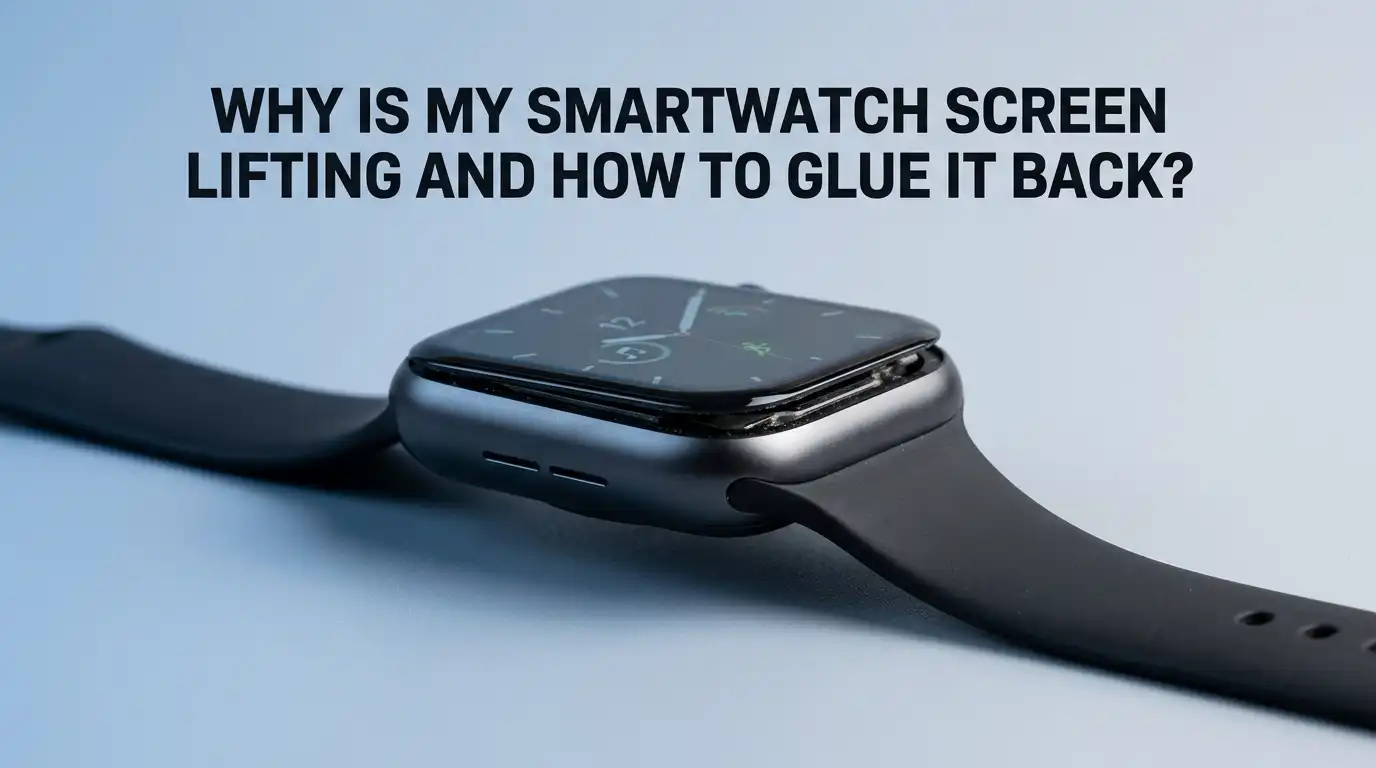
A lifting screen shows clear visual clues you can spot easily. You will see a thin gap between the glass and the metal or plastic case. The gap may run along one edge or wrap around the whole watch.
Sometimes the screen sits unevenly, with one corner higher than the other. You might also notice dust trapped under the glass or a faint rainbow line near the gap.
Touch sensitivity can drop in the lifted area because the digitizer no longer sits flush against the body. In bad cases, the screen wobbles when you press it. These signs all point to either glue failure or pressure from inside the watch.
Reason 1: Swollen Battery Pushing the Screen Up
A swollen battery is the number one reason smartwatch screens lift. Lithium ion cells produce gas when they age, overheat, or get overcharged. That gas has nowhere to escape, so the battery puffs up like a small pillow.
The growing pressure pushes against the display from inside and pops it loose. Apple Watches, Fitbits, and Galaxy Watches all show this problem, often after two to three years of use. You can test for this by pressing the lifted edge with your finger.
If you feel a spongy push back, the battery is the culprit. Do not glue the screen back down if the battery is swollen. The pressure will lift it again, and worse, the cell could rupture.
Pros of identifying battery swelling early: you avoid fire risk and save the rest of the watch.
Cons: you must replace the battery before any glue repair, which adds cost and effort.
Reason 2: Old Adhesive Breaking Down Over Time
The factory adhesive on smartwatches has a limited life. Daily sweat, hot showers, sunscreen, and gym sessions slowly weaken the bond. Heat is the biggest enemy of watch glue.
Leaving your watch in a hot car or under direct sun softens the adhesive and makes it lose grip. Constant wrist movement also flexes the seal hundreds of times each day. After 18 to 24 months, the original bond can simply give up.
This kind of lifting feels different from battery swelling. The screen sits flat against the case when you press it and does not bounce back. If that matches your watch, a fresh layer of glue will usually fix it for good.
Reason 3: Drops, Impacts, and Water Damage
Even a small drop can crack the adhesive seal without breaking the glass. The shock travels through the case and breaks the bond at the weakest point, usually a corner. Water exposure causes similar problems.
Hot water and steam expand the air trapped inside the watch and push outward against the seal. Swimming with a watch not rated for it will let water seep under the screen and dissolve the glue.
Salt water from the ocean is even more harmful. If your screen lifted after one of these events, check carefully for internal moisture before sealing it. Trapped water under the display will cause corrosion, fogging, and dead pixels later on.
How to Tell If Your Battery Is Swollen
Before you reach for glue, run a simple safety check. Place your watch on a flat table with the screen facing up. Look at it from the side at eye level. A flat screen with a small even gap usually means glue failure.
A bulging or domed screen means the battery is pushing up. Next, press the center of the display gently with your thumb. If it feels firm, the adhesive is the problem. If it feels squishy or bounces back slowly, stop and remove the battery.
You can also spin the watch on a smooth surface. A swollen back will make it wobble like a coin. Always trust these signs over hope. A bad battery is a fire hazard.
Safety First: When to Stop and Get Professional Help
Some situations call for an expert, not a DIY fix. Stop right away if you see bubbling, smell a sweet chemical odor, or feel heat coming from the watch. These are signs of a failing lithium cell that could vent or ignite.
Do not puncture, bend, or squeeze a swollen battery under any condition. If your watch is still under warranty, contact the maker first. Apple, for example, has extended warranties on certain models with known battery defects.
Professional repair shops have proper tools, suction cups, and heat plates that reduce the risk of cracking the glass. If your watch cost more than 300 dollars, the small repair fee is often worth the peace of mind.
Pros of professional repair: trained hands, warranty on the work, and proper disposal of bad batteries.
Cons: higher cost, longer wait time, and possible loss of personal customizations.
Tools and Materials You Will Need
Gathering the right supplies before you start saves time and stress. You will need a small plastic pry tool or guitar pick to lift the screen safely. A hair dryer or heat gun on low setting helps soften old glue.
Isopropyl alcohol at 90 percent or higher cleans the surfaces and removes glue residue. You also need cotton swabs, a microfiber cloth, and a pair of plastic tweezers. The glue itself should be B7000 or T7000 for the strongest bond.
Pick T7000 if your watch has a black bezel. Pick B7000 if the bezel is light or clear. Add rubber bands or small spring clamps to hold the screen down during curing. Skip metal tools if you can, since they scratch and conduct static.
Step by Step Guide to Gluing Your Smartwatch Screen Back
Now for the main repair. Follow each step slowly and never force anything.
First, power off the watch and remove the bands. Place it on a clean, flat surface with good lighting. Use the hair dryer to warm the screen edge for about 30 seconds.
This softens the old adhesive without damaging the display. Slide the plastic pry tool gently into the gap and lift the screen just enough to access the inside. Be very careful with the ribbon cable that connects the display to the main board. Do not pull it loose.
Next, clean both surfaces. Dip a cotton swab in isopropyl alcohol and wipe away every bit of old glue from the frame and the back of the screen. Let it air dry for two minutes.
Apply a thin, even bead of B7000 or T7000 around the inside edge of the case. Less glue is better than more, since excess will squeeze out and smear the screen.
Finally, press the screen down firmly. Wipe off any glue that pushes out with a dry swab. Wrap the watch with two or three rubber bands to hold pressure across the surface. Leave it untouched for 24 hours minimum, and 72 hours for a full cure. Then test the touch and water seal.
B7000 vs T7000 Glue: Which One Should You Pick?
These two adhesives dominate smartwatch repair for good reason. B7000 is clear, flexible, and waterproof once fully cured. It works well on watches with light colored or transparent bezels. The clear finish hides any small squeeze out around the edges.
T7000 is the same formula but in black. The dark color blocks backlight bleed and looks cleaner on watches with black frames. Both glues stay slightly rubbery, which absorbs shock from daily bumps. They also resist sweat and most cleaning products.
Pros: strong bond, flexible cure, easy to apply with the included precision tip, and low cost.
Cons: strong smell during application, long full cure time, and the tube dries out if not sealed tightly.
Avoid super glue or cyanoacrylate types. They turn brittle and crack the bond within weeks.
Alternative Adhesives and Methods You Can Try
If you cannot get B7000 or T7000, a few other options exist. Double sided adhesive tape made for phone repair comes in pre cut shapes for popular watch models. It sticks instantly and needs no curing time.
The downside is weaker waterproofing and a thicker seam. E8000 glue is another option similar to B7000 and works just as well.
Some people use UV cure liquid optical adhesive, but this requires a UV lamp and steady hands. Hot melt glue and household craft glue should never go near a smartwatch. They fail quickly under heat and sweat.
Pros of adhesive tape: fast, clean, and no waiting time.
Cons of tape: weaker seal, harder to reuse, and not ideal for swollen battery aftermath.
How to Cure and Clamp the Screen Properly
Curing is the step most people rush, and that ruins the repair. Even pressure across the whole screen is what makes the bond strong. Rubber bands wrapped in a crisscross pattern work well for round watches.
For square or rectangular watches like the Apple Watch, two small spring clamps with soft jaws give better results. Place a soft cloth between the clamp and the glass to avoid scratches. Keep the watch at room temperature, around 70 degrees Fahrenheit, during the cure.
Cold rooms slow the chemical reaction and weaken the bond. Avoid charging or wearing the watch for at least 24 hours. A full 72 hour cure gives the best long term results and water resistance.
Testing Your Repair and Restoring Water Resistance
Once the glue has cured, run a few simple tests. Press every edge of the screen gently and check for any movement. Turn the watch on and swipe across the entire display to make sure touch works everywhere.
Look for light leaks around the bezel in a dark room. Hold the watch close to your ear and listen for any rattling. A solid repair will feel like one piece. Keep in mind that DIY repairs rarely restore full factory water resistance.
Treat the watch as splash proof only from now on. Avoid showers, swimming, and saunas. Apply a thin extra bead of glue on the outside seam for added protection if you want.
How to Prevent Your Smartwatch Screen From Lifting Again
Prevention is easier than repair. Charge your watch with the original cable and avoid overnight charging when possible. Lithium batteries last longer when kept between 20 and 80 percent.
Take the watch off in hot tubs, saunas, and showers. Heat is the main reason adhesive fails early. Wipe sweat off the case after workouts and let it dry fully. Avoid harsh cleaners like bleach, acetone, or alcohol wipes on the seam.
Use only a soft damp cloth. Replace the battery every two to three years if you plan to keep the watch long term. Store the watch in a cool place when not in use. These small habits can double the life of the screen seal.
Frequently Asked Questions
Is it safe to use a smartwatch with a lifted screen?
It is not safe to keep using it. Dust, sweat, and water can enter and damage the internal parts. If a swollen battery is the cause, continued use raises the risk of fire. Stop wearing and charging the watch until you check the battery and complete the repair.
Can I use super glue to fix my smartwatch screen?
No, super glue is a poor choice. It dries hard and brittle, so it cracks under daily wrist movement. It also damages plastic bezels and can fog the display. Stick with flexible adhesives like B7000 or T7000 made for electronics.
How long does B7000 glue take to dry on a smartwatch?
B7000 sets enough to handle in about 6 hours. Full cure takes 24 to 72 hours depending on humidity and room temperature. Do not wear, charge, or expose the watch to water during this window for the best result.
Will gluing the screen back affect water resistance?
Yes, water resistance will drop after any DIY repair. The factory uses pressure sealed gaskets that home repair cannot match. Treat your watch as splash proof only after a glue repair, even with quality adhesive applied carefully.
How much does professional smartwatch screen repair cost?
Prices vary by brand and model. Apple Watch repairs range from 80 to 300 dollars. Samsung and Fitbit charge around 100 to 200 dollars. DIY repair with glue and tools costs less than 15 dollars but does not include battery replacement.
Can a swollen smartwatch battery explode?
Yes, though it is rare. Lithium batteries can vent or catch fire if punctured, crushed, or overheated. Stop using the watch right away, store it in a cool dry place, and replace the battery before any other repair.

Hi, I’m Rue Hessel, the founder and voice behind TheGenTool. I’m a passionate tech enthusiast who loves exploring the latest gadgets, smart devices, and electronics that shape our everyday lives. Through my website, I share honest, hands-on reviews of trending Amazon products to help you make smarter and more confident buying decisions.